We get technical support questions pretty regularly requesting info
on how to perform tasks like updating a mainboard BIOS or making
filesystem fixes. I thought it might be helpful to offer our general
procedure so others can have access to this information as well. Here’s a
quick how-to on Booting to MS-DOS 7.0 from a USB Drive.
Tools you will need:
Your USB drive is now bootable.
Insert your newly formatted drive into any USB-bootable mainboard, reboot, and select the USB drive as the first boot device. You will be brought to a Windows 98 MS-DOS prompt. From here you can update your BIOS, make system disk fixes, etc.
Tools you will need:
- Windows 98 System Files (hosted at Extreme Overclocking):
- HP USB Disk Storage Format Tool (hosted at Extreme Overclocking):
- USB thumbdrive (256MB will work fine)
- Download and extract the win98boot.zip. This directory will be used later.
- Download SP27608.exe. Run the installer to install HP USB Disk Storage Format Tool.
- Insert a blank USB thumbdrive into your systb. *** Warning! All data on this USB drive will be erased! ***
- Run the HP USB Disk Storage Format Tool (Start >> Programs >> Hewlett-Packard Company >> HP USB…Tool)
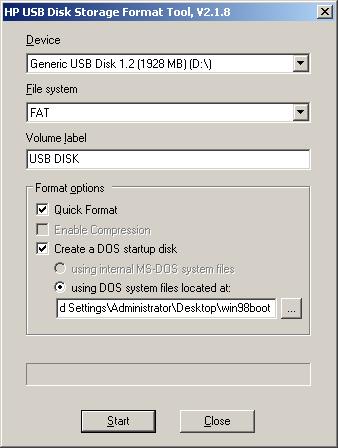 Click for full size |
|
Insert your newly formatted drive into any USB-bootable mainboard, reboot, and select the USB drive as the first boot device. You will be brought to a Windows 98 MS-DOS prompt. From here you can update your BIOS, make system disk fixes, etc.

No comments:
Post a Comment